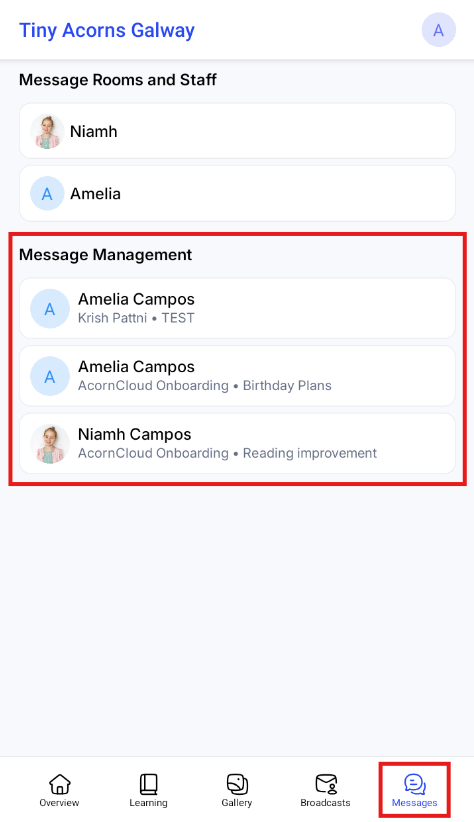
Direct Messaging allows managers to have private, one-on-one conversations with parents directly from AcornCloud. Messages are linked to a child and sent to all parents with Parent Portal access for that child.
 Open the Messaging Screen
From the menu, go to Messaging
 Start a New Conversation
Click Start a New Thread
 Select a Child
In the popup, select the child you want to message about
 Note:
Note:
This will send the message to all parents linked to that child who have Parent Portal access.
 Name the Thread
Add a thread name (e.g. “Settling In”, “Nap Times”, “Upcoming Trip”)
Click Start Thread
 Send Messages
Your new thread will now appear in the list
Click on the thread to open it
Type and send your message
 Find Conversations
Use the search bar to quickly find specific message threads
 Good to Know
Messages are linked to the child, not individual parents
Only you and the child’s parents/guardians (who have parent portal access enabled) will have access to this message thread
All linked parents will receive the message
Great for sharing messages you don’t necessarily want to share with the rest of staff
For service-wide messages, use Broadcasts instead
What it looks like to ParentsParents can’t start threads with managers themselves - they can only respond to threads that managers have started.
Parents can find the direct messaging thread in the Parent Portal App by navigating to Messages. The new thread will be under the heading “Message Management”