Overview & availability
AcornCloud's AI tools are available to Managers on your account. Staff and parent app users do not see these features. There's nothing to enable - if you're a Manager, the AI buttons will appear automatically in the relevant areas of the app.

AI in broadcasts
Broadcasts are messages sent to parents or groups. The AI tools here help you write a full broadcast from scratch - or refine one you've already started.
Magic write: Generate
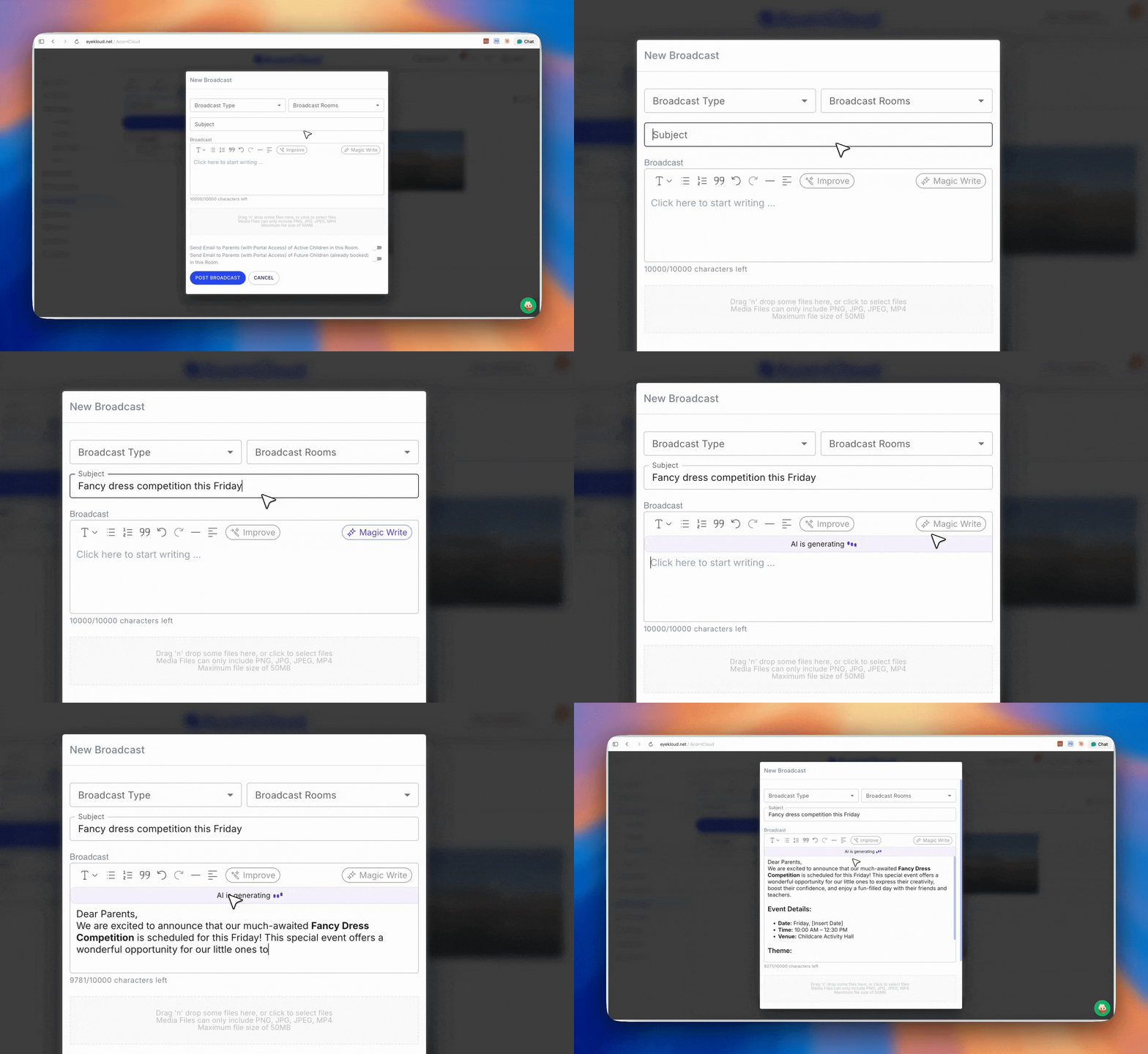
Type a subject line (e.g. "Fancy dress competition this Friday") and click the Magic Write button. The AI will generate a complete, well-structured broadcast for you — including placeholders for dates or other details you want to personalise. You can keep it as-is, edit it, or use it as a starting point.
Note: The Magic Write button only becomes active once you've typed a subject. Without a subject, it will remain greyed out.
Improve: Refine
Already have content? Select any portion of your broadcast text, then click Improve to access a range of refinement options:
Change tone - make it more friendly, professional, or casual
Make it longer - expand on the selected text with more detail
Make it shorter - condense the selected text
Continue writing - add new sentences that follow naturally from where you left off
AI in lesson plans
Writing lesson plans from scratch takes time. The AI tool in this area generates a complete, structured lesson plan based on the name you give it - following the format AcornCloud recommends for early years planning.
Magic write for lesson plans: Generate
Enter a lesson plan name (e.g."Learning to play with blocks")
Click Magic Write
If the editor already contains content, you'll see a confirmation prompt - confirm to replace it with the AI-generated plan
The generated plan will follow the standard structure including: environment setup, activities, learning intentions, and role of the educator
Review, edit, and save as normal
AI in messaging
The messaging AI tool helps managers respond to parent messages faster by generating a suggested reply based on recent conversation context.
Smart reply: Generate
When viewing a message thread, click the AI reply button to generate a suggested response. The AI reads the last 5 messages in the thread for context and drafts a relevant reply.
Important: The AI only uses the most recent 5 messages - it does not have access to your full message history. This is by design, to keep the feature fast and focused.
Pricing & what's coming next
The current AI tools: Magic Write, Improve, and Smart Reply - are included in your AcornCloud subscription at no additional cost.
These are Phase 1 features. We are continuing to develop more advanced AI capabilities which will be made available as an optional add-on in a future release. We'll communicate pricing and details when they are ready.
FAQs

